Posts

Showing posts with the label Nuke tools

lockNode for nuke

Image
lockNode.py Locking the nodes knobs (sliders) inside nuke very long waited future. It is requested many time with foundry but i don't think they going to add this unique future. So i have decided to create a python code for this function. Her is the solution. This code allow user to lock the nodes knob. Once you lock the knobs, then you cant modify any sliders until you un-lock the knobs. This will save you from any accident changes. Hope this will help you guys. Latest version support to write the info to your nuke script. So it will always locked if you close your nuke script and re-open it. I have used some cheat method to keep the node locked while user save their nuke script. I have tested many times and haven't faced any issues. Let me know if you faced any issues. steps: right mouse click on node property panel. You will get options 'lock_knobs' and 'unlock_knobs'. Select 'lock_knobs'. This code will lock will the knobs and...
switchMatte

Image
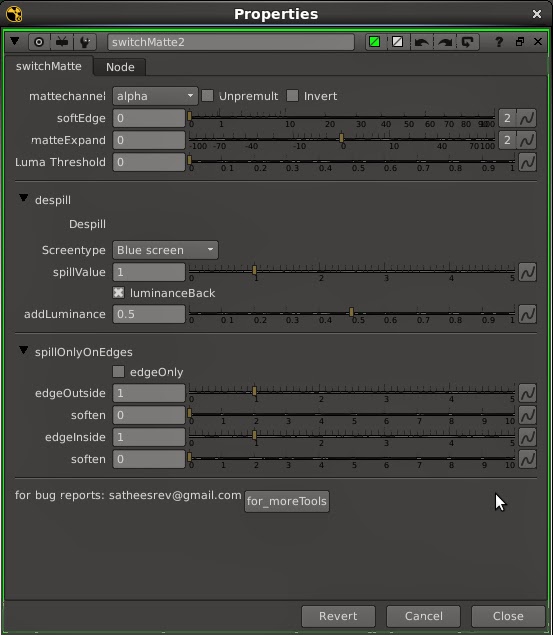
switchMatte v2.0 So long before i created this tool for my personal use. Recently improved the tool with extra control's. switchMatte v2.0 works like shakes switchmatte and Fusion matte control. Added spill control with in the node So user no need to add extra Spill nodes. switchMatte v2.0 interface. Matte channel drop-down menu allowing you to choose the matte channel. User can expand and blur the alpha channel. Luma threshold slider can increase and decrease the luminance value. Despill menu allowing you to remove the spill from the image. spill only edges control the despill area.  Download and play with this tool and leave the comment and requests. Download: http://www.nukepedia.com/gizmos/channel/switchmatte

Lock and unLock node settings in nuke

Image
Lock and unLock node knobs Nuke doesn't have inbuilt function for lock the node settings( knobs, sliders), Like fusion's node lock function. While working with bigger scripts most of the time we accidentally  adjust the node sliders with out knowing which node is selected. ( what the hell is happening i didn't adjust anything..... ????!!!!! ) This code lock selected nodes knobs. So no worrier’s about accident changes. Right click on the nodes property panel. You will get knobLock & unlock short-cut key. menu.py: import lockNode nuke.menu("Properties").addCommand('lock_Knobs', 'lockNode.lockNode(True)') nuke.menu("Properties").addCommand('unlock_Knobs', 'lockNode.lockNode(False)') Download:  locknode.py Hope this will help you friends.

nAnaglyph.gizmo

Image
nAnaglyph.gizmo Hi friends i made a gizmo called nAnaglyph for render stereo footages as anaglyph files ( mov or jpg sequence ). Usually what we do to create anaglyph proxy (mov - jpg sequence). Open Nuke--> projectSettings-->Views and press set up views for stereo. Then import our Left, Right sequence. Add joinViews from stereo menu and add anaglyph Node and play with some settings. Finally we are ready to render our files. For reduce the timing of above job i found a solution. Because I'm bit crazy lazy fellow (I'm a TD). so i created nAnaglyph.gizmo. nAnaglyph.gizmo: Open Nuke. import your Left, Right footages, Add nAnaglyph.gizmo connect it with your L,R read nodes... Bang!!!! your ready to render. ( sorry folks currently nAnaglyph supports red-cyan only. Have future plan to add other color schemes ) Hope it will help you friends. Nukepedia: http://www.nukepedia.com/gizmos/gizmo-downloads/stereo/nanaglyph / download: https://skydrive.live.co...

some python snippets for nuke

Image
1. To change selected nodes Values. for i in nuke.selectedNodes() :     i['size'].setValue(20) [what is happening when i run this code in script editor inside nuke? Most compositors and learners (scripting) question is above one. Here is the answer. When you run this into your nuke script editor it will doing some repeated work. Example if you selecting 10 Blur nodes and run this it will assign the name of i to the 10 Blur nodes and it will start to change the 'size' as 0 - 20 one by one.] 2. Hide all nodes input. for i in nuke.allNodes() :     i['hide_input'].setValue(1) (for active back use 0 on setValue) 3. Hide selected nodes input. for i in nuke.selectedNodes() :     i['hide_input'].setValue(1) 4. For lock all connections. nuke.Root().knob('lock_connections').setValue(1) 5. To set all read node start to custom frame. for a in nuke.allNodes():     if a.Class() == 'Read':   ...

extractFrame.py

Image
ExtractFrame : extractFrame is a python script for Nuke. extractFrame grab out a single frame from your image sequence (input, footage, etc). Usually we add a "Frame Hold" node and give the value off which frame we need. extractFrame pop-up a window, it will automatically carry the current frame, you can mention the frame which you want on the "which frame you want to extract" field or else it will automatically use your current frame. Result while specify the frame no: Result with out specify frame no: Python file: http://www.nukepedia.com/python/misc/extractframe else copy paste below code as extractFrame.py. ''' Created on 01-Mar-2012 updated on 16-apr-2013 @author: satheesh.R contact: satheesrev@gmail.com ''' import nuke ## creating panel def extractFrame(): curFrame = nuke.frame() ef = nuke.Panel("extractFrame..... by satheesh-R", 50) ef.addS...