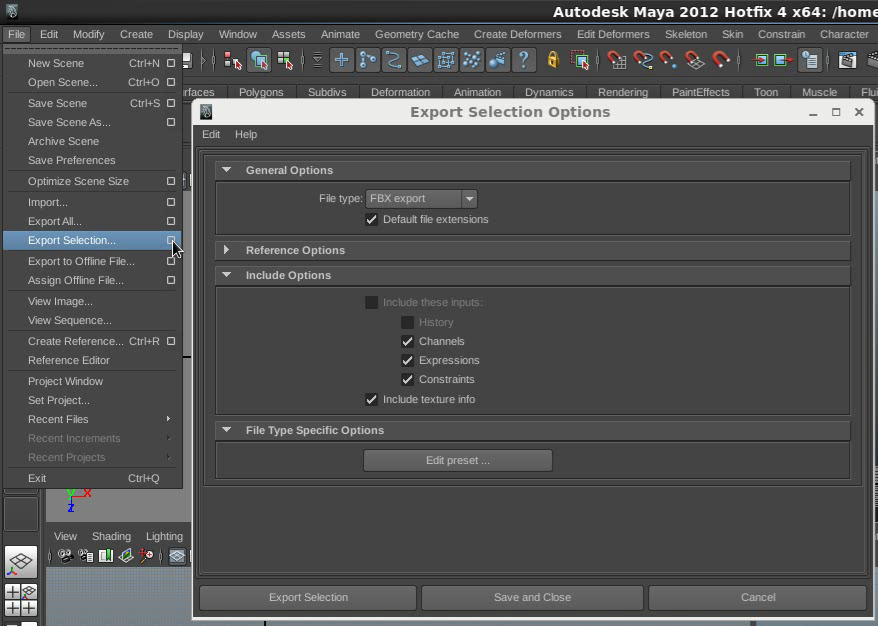
Export Maya camera and Objects to Nuke Exporting Maya Camera and Objects to Nuke is really night-mare. Using .fbx file format will fail most of the time. Scene not align perfectly, meshes not displaying properly, Camera missing the key-frames, etc. Reason for this is both the software's handling Cameras in different manner. There are several scripts available for exchanging data's between mayaToNuke. Each one having their plus and minuses. I found a clever python script to do the data exchange successfully. I done some custom with the original script and used it several time with out any failure. I created a new maya scene for tutorial purpose with animated camera and couple of objects. Maya to nuke traditional export method: Step-1: Selected all the objects and Camera. Step-2: Go to file---> Export Selection.... step-3: Go to Edit Presets and Change fbx format to fbx2010. step-4: Export Selection and save it as a .fbx file. step-5: Added ReadGeo ...
Nuke work flow optimisation tips: Work flow optimisation is very important and help-full while you render or preview the shot. When you working with bigger shots you should optimise your script for better working speed and rendering. Otherwise you always suffer lot with your machine.... God damn in slow ???!!!!! Here i'm going to give you guys some off my own way off working style and work flow optimisation tips.... Hope this will help you guys.... at-least... First thing first. 1. Avoid multiple read nodes. 2. Keep adding(over) your FG layers always on "A" input and keep connect BG to "B" input. Working like this way will help to keep track your "BoundingBox" size. Have a habit to always set your bbox to "B" from "union" after adding every Merge. i personally use to do this when ever add "Merge" node ( in some case you need keep it union, like.... BG replace, match-moving ) If you forge...
lockNode.py Locking the nodes knobs (sliders) inside nuke very long waited future. It is requested many time with foundry but i don't think they going to add this unique future. So i have decided to create a python code for this function. Her is the solution. This code allow user to lock the nodes knob. Once you lock the knobs, then you cant modify any sliders until you un-lock the knobs. This will save you from any accident changes. Hope this will help you guys. Latest version support to write the info to your nuke script. So it will always locked if you close your nuke script and re-open it. I have used some cheat method to keep the node locked while user save their nuke script. I have tested many times and haven't faced any issues. Let me know if you faced any issues. steps: right mouse click on node property panel. You will get options 'lock_knobs' and 'unlock_knobs'. Select 'lock_knobs'. This code will lock will the knobs and...


thank you
ReplyDelete